Font size options
Increase or decrease the font size for this website by clicking on the 'A's.


Contrast options
Choose a color combination to give the most comfortable
contrast.
Android Essentials for Beginners an introductory session covering the basics of Android devices. Learn how to set up your phone and use essential features. Must bring your own device.
Android Essentials for Beginners is a fast-paced, comprehensive 60-minute crash course designed for individuals new to Android smartphones.
The session begins with an introduction to the Android operating system and its history, followed by guidance on setting up your device for the first time and creating a Google account. Participants will then be taught essential navigation skills, including how to organize the Home Screen, use gestures, and access important features like the Quick Settings and Notification Center.
The course will cover key topics such as connecting to Wi-Fi and Bluetooth, managing calls and text messages. Essential Android settings will be explored, along with helpful suggestions for making the most of Google Assistant and an interactive Q&A, giving you the chance to get answers to any questions you may have.
Don’t miss this opportunity to get started with Android! Must bring your own device.
Free and open to the public. Seating is on a first-come, first-serve basis and may be limited. For more information, call 702.507.3944
AGE GROUP: | Adults |
EVENT TYPE: | Computers & Technology |
| Mon, Mar 30 | 10:00AM to 8:00PM |
| Tue, Mar 31 | 10:00AM to 8:00PM |
| Wed, Apr 01 | 10:00AM to 8:00PM |
| Thu, Apr 02 | 10:00AM to 8:00PM |
| Fri, Apr 03 | 10:00AM to 6:00PM |
| Sat, Apr 04 | 10:00AM to 6:00PM |
| Sun, Apr 05 | Closed |
| (Easter Sunday) | |
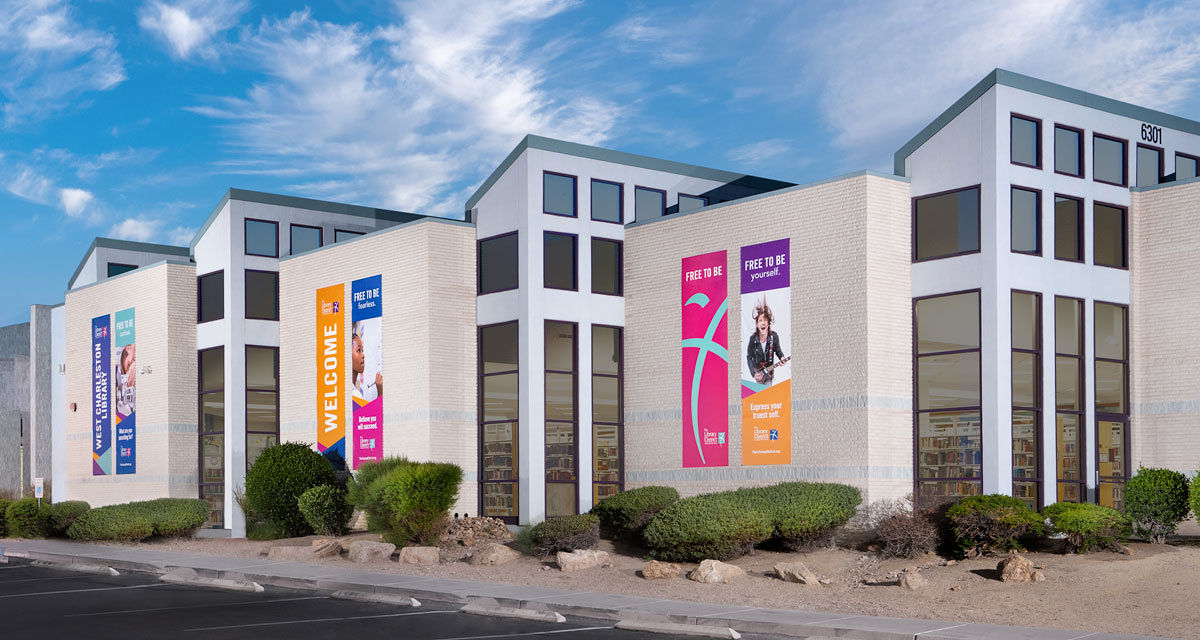
Originally operating out of a storefront on Brush Street, the West Charleston Library opened in its current location in January 1993. This 38,900-square-foot building is located on the northeast corner of the College of Southern Nevada’s Charleston Campus. This location, which features a Digital Memory Preservation Lab, serves its student population and residents with over 67,000 volumes and features a 276-seat lecture hall.